 formerly FinancialForce
 formerly FinancialForce


Ten reasons why a single digital platform means growth for your business

See how Certinia PSA and ERP solutions
transform and optimize operations





Optimize resource utilization by managing your customers, teams, and projects in a single application.

Improve customer satisfaction and retention with a scalable approach to orchestrating success.

Services automation
Give customers a seamless experience of sales and service delivery on the Salesforce Platform. Certinia improves services estimating, delivery, profitability, and satisfaction.

Accounting & finance
Simplified customer billing untangles the knots in revenue recognition. Certinia cloud accounting and financial reporting gives you complete control of spend.

Analytics & insights
Target, track and optimize core services and business processes. Integrate financial metrics, such as utilization, margin, revenue and productivity, with service delivery KPIs to achieve continuous innovation.

Customer & partner portals
Deliver excellent customer experiences, swiftly answer project questions, and provide real-time updates through customer and partner portals that turn your services delivery into an authentic conversation.

A single source of certainty
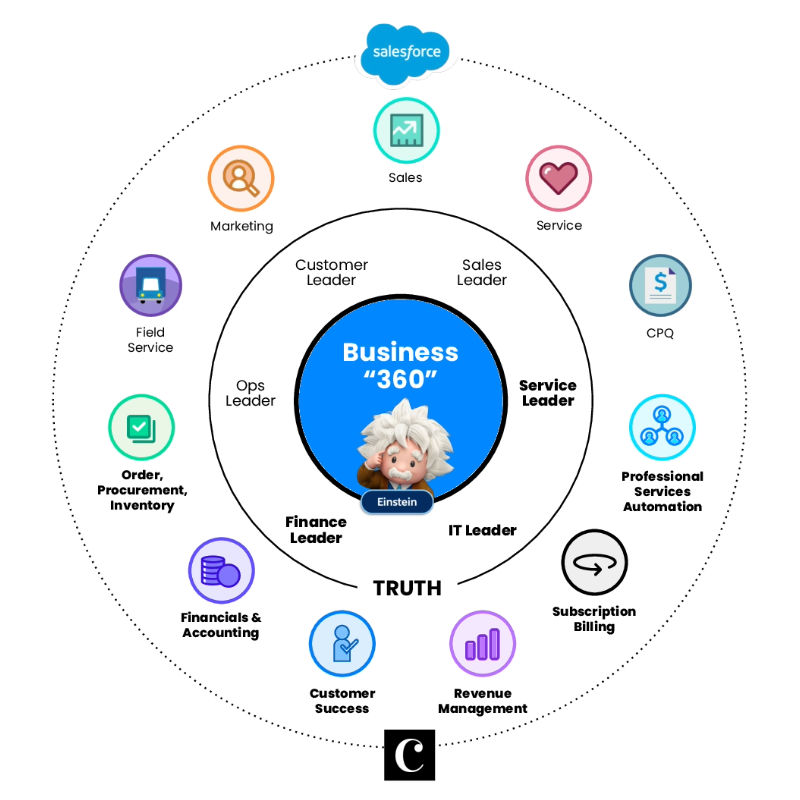
Certinia is native to Salesforce–sharing the same customer record, user experience, and industry leading analytics as the world’s most trusted cloud business platform. Empower your teams with real-time collaboration across your entire services business and deliver truly differentiated customer experiences.

We have built an incredible Certinia instance! Historically, the numbers are mind-blowing. In the last 3 years alone, we’ve integrated 10 companies, added 7000 users, managed revenue forecasts to 1% variance +/-, increased our billable hours by $14m, and are pushing $2.5B through the app. Since we launched Services CPQ, and with our other customizations, we now consider ourselves as having one of the premiere Certinia orgs globally.
Mark Conklin, Senior Director, Operations


Certinia are not only a software vendor but a strategic partner for HPE. I need a vendor that can engage from ideation to concept to design to push the boundaries of needs and differentiate experiences for our customer, employees and partners. Certinia is key to providing thought leadership for me to design for tomorrow, not for today.
Adam Jones, Strategist, HPE Pointnext Services Delivery


Certinia helped us transform and begin our journey to being a data-driven organization. If it wasn’t for this partnership, we wouldn’t have been able to make this huge change for the better.
Michael J. Kennedy, CFO


The Certinia partnership and platform allows us to effectively manage and grow our solution business, by focusing on project profitability, labor, variance, utilization, and capacity. By enabling project collaboration and accurate delivery for customers, the solutions help us to improve the overall customer experience.
Kim McCullough, Business Capability Leader Philips


By implementing Certinia, we now have the systems, processes, and data accuracy we need to accommodate new business growth.
Alex Calder, Head of Finance, United Services Group


Splunk was able to make a swift transition to remote delivery and re-engineer in real-time amidst the global COVID-19 crisis. While the shift required some short-term heavy lifting, we were quickly up and running smoothly in the new normal. This would not have been possible without the flexibility that Certinia and Salesforce provided.
Toni Pavlovich, Chief Customer Officer, Splunk


We don’t want a front office and a back office–we just want one office. Certinia will integrate all our operations and enable us to implement best practice across our organization. It was important to us that it be cloud-based, secure, and customer oriented. That’s the way our business works.
Brad Campbell, CFO, Novotech